
STM32F103C8T6 User Guide: Hardware Design, Programming Basics, Common Issues & Solutions (Based on Latest Official Documentation)
The STM32F103C8T6 is a mainstream performance line Arm® Cortex®-M3 microcontroller from STMicroelectronics, classified as a medium-density device, widely used in motor control, industrial applications, and consumer electronics. This guide is written strictly based on the latest official ST documentation. All data and recommendations are cited with sources and contain no fabricated content. The document is updated to July 2025 and is suitable for beginners and developers alike.
1. Chip Specifications Overview
- Core: Arm® 32-bit Cortex®-M3 CPU, up to 72 MHz.
- Memory: 64 KB Flash, 20 KB SRAM.
- Peripherals: 37 GPIOs, timers, 2×12-bit ADC, USART, SPI, I²C, CAN, USB, and more.
- Package: LQFP48, etc.
STM32F103C8T6 Physical Package and Pinout Diagram (LQFP48):

Source: STM32F103x8 / xB Datasheet DS5319 Rev 20 (Released July 28, 2025)
2. Development Board (Common Blue Pill Form Factor)
The most common development board form for the STM32F103C8T6 is the Blue Pill, featuring onboard USB, a reset button, LED (PC13), and more — ideal for getting started quickly.
Blue Pill development board photo (top view):

Blue Pill development board from another angle (multiple views):

Source: STM32-base project and public development board documentation
3. Hardware Design Guide (Recommended Reading: AN2586)
Recommended Power Decoupling Circuit (each VDD pin requires 100 nF + 10 µF capacitors; VDD_A requires additional treatment):

Decoupling & Vcc Pin Configuration for STM32 MCUs - STMicroelectronics Community
Typical crystal oscillator and power decoupling connection diagram:

Your Own Hardware: Using KiCAD to Design a Minimal STM32 Development Board – Page 1000 – Vivonomicon's Blog
4. Pin Distribution and Functions (Pinout)
Complete STM32F103C8T6 Pinout Diagram (Blue Pill version, with peripheral annotations):

STM32F103C8T6 Blue Pill Pinout, Peripherals, Programming and Features
5. Development Environment and Programming Basics
Recommended Tools: STM32CubeIDE + STM32CubeMX (graphical configuration).
STM32CubeMX Configuration Interface Example (pin and peripheral configuration):

How to export a project configuration to a compati... - STMicroelectronics Community
STM32CubeIDE project configuration screenshot example:
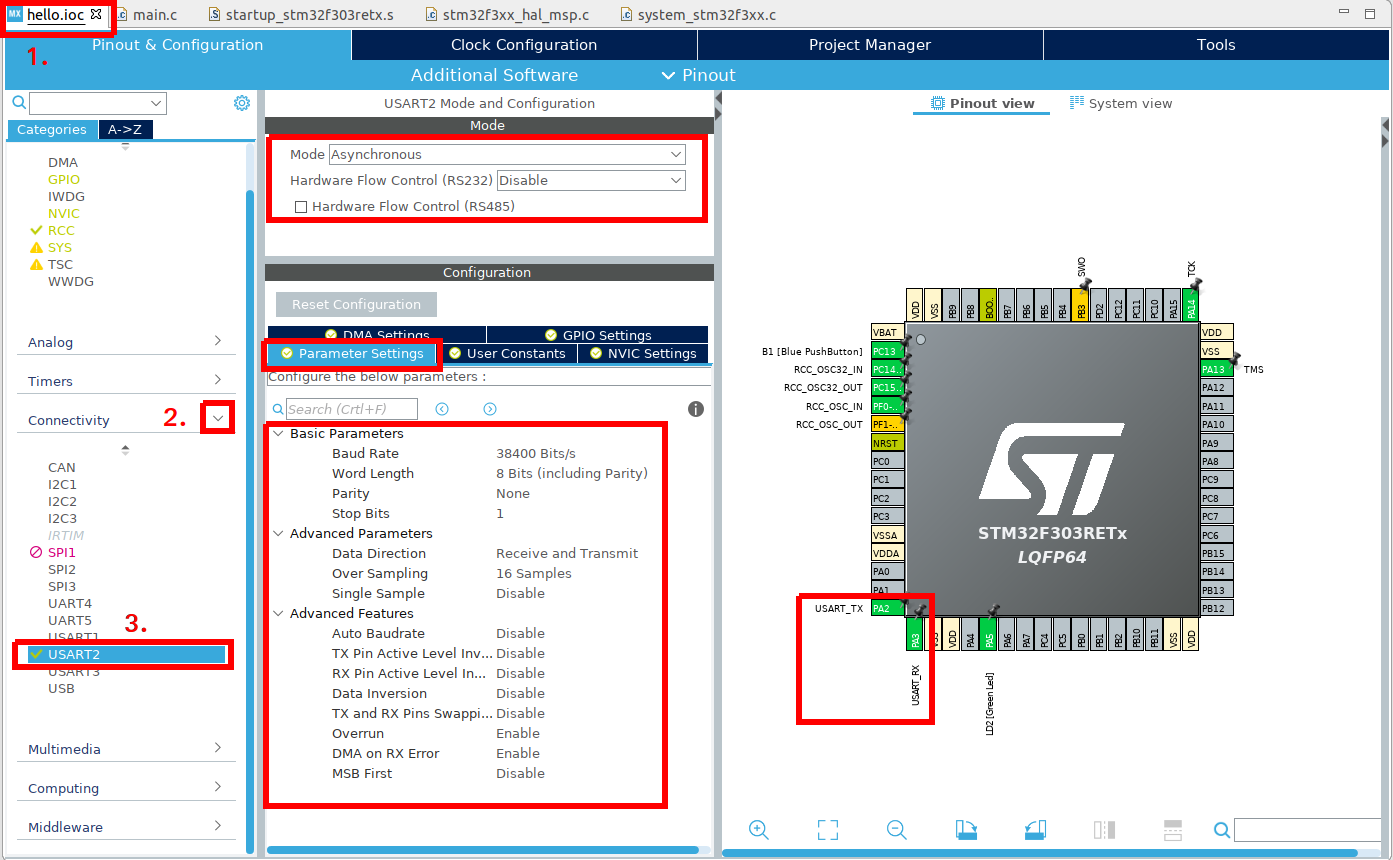
Tutorial: Getting started with an ST development board using STM32CubeIDE
SWD debug connection diagram (ST-Link V2 connected to Blue Pill):

Barnaby Walters • Programming a Blue/Black Pill STM32 Board with a ST-Link v2
Getting started steps: use CubeMX to configure the clock (72 MHz), GPIO, generate HAL code, then debug in CubeIDE.
Source: UM2553 STM32CubeIDE Quick Start Guide (Rev 5, February 2026); ST Wiki.
6. Common Issues and Solutions
- Fails to start / Reset anomaly: Insufficient power decoupling or NRST issue → Add decoupling capacitors + 100 nF NRST capacitor.
- ST-Link connection failure: Wiring error → Verify GND / 3.3V / SWDIO / SWCLK / NRST connections.
- USB not working: D+/D- reversed or insufficient power → Check PA11/PA12 pins.
Additional hardware schematic references (power supply and crystal oscillator section):

Source: ES096 Errata Sheet Rev 15; AN2586 Rev 8
7. Recommended Development Approaches
- Highly recommended: STM32CubeIDE + CubeMX + HAL/LL libraries.
- Beginner-friendly: Start with Blue Pill + ST-Link to practice GPIO LED blinking.
- Advanced: Register-level programming or integrating FreeRTOS.
Note: For production projects, always use genuine chips and consult the latest Errata. Clone boards may have differences — verify using STM32CubeProgrammer.
Reference Resources
- Datasheet: https://www.st.com/resource/en/datasheet/stm32f103c8.pdf (DS5319 Rev 20)
- Hardware Guide: AN2586
- Tool Downloads: STM32CubeIDE / CubeMX from the official ST website
This guide includes multiple high-resolution images to help readers quickly understand the hardware layout, pinout, and development workflow. If you need specific peripheral code examples, PCB reference designs, or additional images, feel free to leave a comment on the website.
Image Source Statement: All images are sourced from public technical websites and ST-related documentation (such as the STMicroelectronics community, stm32-base.org, Mischianti.org, etc.) for educational and illustrative purposes.
🛒 Ready to Get Started?
If you're looking for a genuine STM32F103C8T6 / C6T6 development board, we carry the Blue Pill form factor with both Micro USB and TYPE-C options, available soldered or unsoldered — ready to use out of the box.
👉 Buy STM32F103C8T6 / C6T6 Development Board – Blue Pill Starter Kit